

| Weight | 0,3 kg |
|---|---|
| Dimensions | 13 × 9 × 9 cm |

STELLAR FlyPods
–28 dBHybrid ANC
29HTotal Battery
12 mmDynamic Driver
IPX5Water Resistant
◎ STELLARvibe App — Auto-EQ · ANC · 5 Themes FREE
In stock · Dispatched within 1 working day · Free delivery in 5–7 working days · Ships from Poland · Price includes VAT
🔒 Secure checkout · Free EU Shipping · 399 days of warranty · 30-Day Returns
Pay by card, Apple Pay or Google Pay
Earbuds that tune themselves. Paired with the free STELLARvibe app, Auto-EQ reads every track and reshapes the sound in about 180 ms — so each song plays with the tuning it was mixed for, automatically. Go further with custom EQ curves and one-tap EQ sharing by link or QR: send a friend the exact sound you’re hearing.
Five STELLARvibe themes to match the mood: Eclipse, dark and focused · Aurora, light and airy · Nebula, neon and electric · Nova, bold and loud · Pulsar, heavy and gold.
Hybrid ANC down to –28 dB for the commute, the gym and the open-plan office, with transparency mode to let announcements and conversations back in without taking an earbud out.
True wireless in-ear design with touch controls and clear calls. 12 mm dynamic drivers with a custom bass port, up to 6.5 h of play per charge and 29 h with the USB-C charging case, and about 2 h from a 10-minute top-up. Bluetooth 5.3 and IPX5 water resistance for training and travel.
Auto-EQ reads the track you’re playing: on Android from any music app, on iPhone from Apple Music and Spotify. Engineered in Hong Kong.
Your sound,
perfectly tuned.
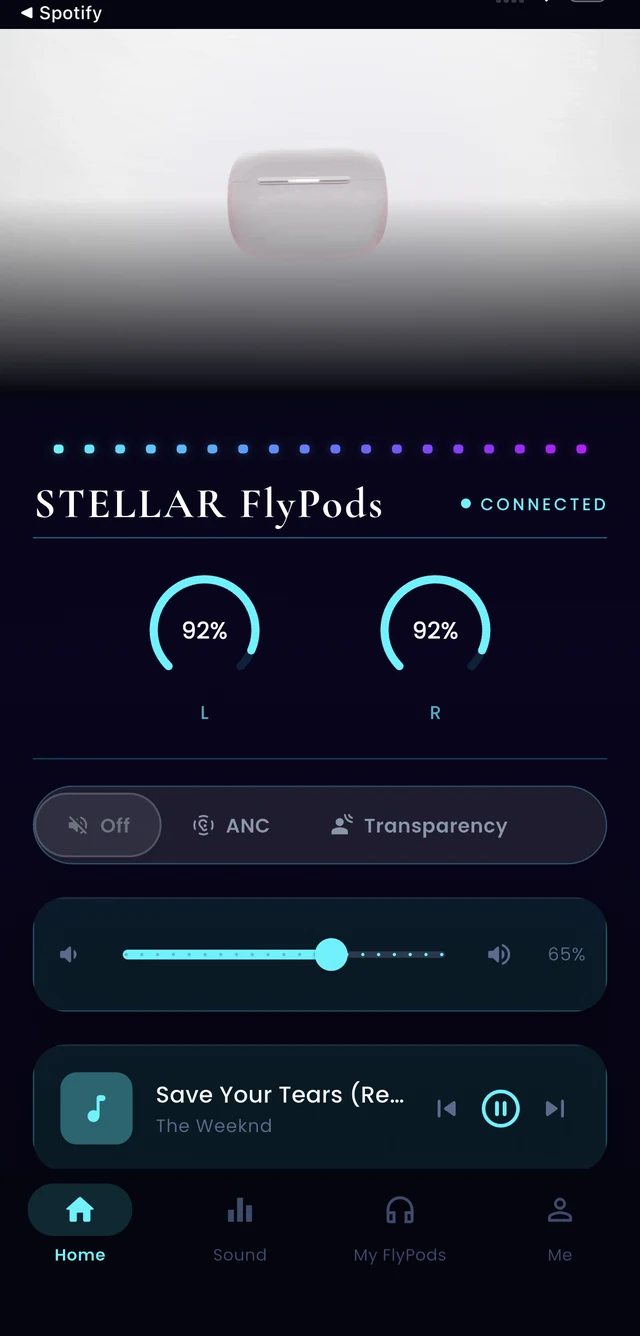
The STELLARvibe app turns your FlyPods into a personalised listening system. Auto-EQ reads each track’s genre and retunes on-device in about 180 ms. ANC, themes, and EQ sharing — all in one place.
Auto-EQ — Genre-Aware Tuning
Auto-EQ detects each track's genre and instantly applies the best-matching tuned preset — 17 curves, on-device, in 180 ms. No setup, no cloud.
ANC & Transparency Control
Switch between –28 dB Hybrid ANC, Transparency, and off — straight from the app. Fine-tune the balance for your environment.
5 Visual Themes
Eclipse, Aurora, Nebula, Nova, Pulsar — each with its own layout, colour palette, and EQ visualiser. Change the feel of your app anytime.
Share Your EQ
Send your personal sound profile to a friend with one tap. They hear music exactly how you hear it — or build their own from scratch.
Auto-EQ and
EQ sharing.
What is Auto-EQ?
Auto-EQ reads the genre of whatever is playing and loads the matching curve — 17 of them — on the earbuds themselves, in about 180 ms. That is before the first beat of the next track. Nothing to set up, and nothing sent to a server. How we taught EQ to read a room →
Can I share EQ settings with someone else?
That is Share EQ. One tap sends your curve as a link or a QR code — whoever opens it hears the track the way you hear it. They can keep your tuning, or start from it and build their own. How to share EQ settings with a friend →
Does Auto-EQ work on iPhone and Android?
Both. STELLARvibe is free on iOS and Android. On iPhone, Auto-EQ follows what is playing in Apple Music and Spotify.
What if I would rather tune it myself?
Then tune it. Auto-EQ is a default, not a cage — build your own curve, save it, switch back whenever you like, and send it on if you think someone should hear it. The best EQ settings for every genre →
Do I need the app at all?
No. FlyPods pair and play like any Bluetooth earbuds. The free STELLARvibe app is what adds Auto-EQ, EQ sharing, ANC control and the five themes. More from the blog →